If you are a Tech Lead or a Technical Manager, you would have interviewed a lot of people. You would have asked, “What is JavaScript?”
In most cases, the answer would be correct. It would go something like this: “JavaScript is a single-threaded, non-blocking event loop.”
Correct. Why is it faster? Because it is non-blocking. Correct. What is a non-blocking event loop — and how is it faster? Especially with a single thread?
Most would not have answered correctly.
At least when I started learning JavaScript seriously, I did not understand the concept for a long time. I came from a Java background. I could not get it.
My thinking was always like this: if you have more workers (multi-threaded — Java), you get things done faster. If you have a single worker (single-threaded — JavaScript), how do you get things done faster?
It took some time to understand. The principles are simple. Difficult to understand. Even more difficult to implement properly.
Basics are still important. If some of the countless JS tutorials had explained this properly, I would not have struggled. Lots of developers struggle with this even now.
Let’s try to understand a few things first.
Is JavaScript actually faster than Java?
Answer: yes and no.
Yes— in IO-heavy scenarios. Web servers handling thousands of concurrent connections. API gateways waiting on database responses. Service Bus consumers processing thousands of messages. In these cases, JavaScript’s non-blocking model wins — not because it is smarter, but because it does not waste time waiting.
No— in CPU-heavy scenarios. Image processing. Complex mathematical computation. Compressing files. Anything that needs raw computational power. Here, Java’s multi-threading gives it a real advantage. Multiple threads doing heavy work simultaneously will outperform a single thread every time.
So “JavaScript is faster” is not wrong. It is just incomplete.
Is JavaScript actually single-threaded?
Again — yes and no.
Yes — the JavaScript engine itself (V8 in Node.js, SpiderMonkey in Firefox) runs on a single thread. Your JavaScript code executes one line at a time, in one thread, in sequence.
No — the environment where JavaScript runs is not single-threaded. Node.js uses libuv under the hood. libuv maintains a thread pool. When you make a file system call, a network request, a database query — libuv hands that work to an OS thread, and JavaScript continues doing other things. When the work is done, the result comes back and JavaScript picks it up.
This is the part most tutorials skip. They say “single-threaded” and move on. But single-threaded only describes the JS engine, not the full picture.
What the event loop actually does
You are a single chef in a kitchen. You are the JavaScript engine. You can only do one thing at a time. You cannot chop onions and stir the pot simultaneously.
But you have assistants — libuv, Web APIs, the OS thread pool. You hand them tasks: “go boil that water, come back when it’s done.” While they work, you keep cooking. When the water is boiled, your assistant taps you on the shoulder, and you deal with it when you finish what you are currently doing.
That tap on the shoulder? That is the event loop. It constantly checks: is the call stack empty? Is there something waiting in the queue? If yes to both — bring it in, execute it.
The call stack is where your code runs. The queue is where completed async work waits for its turn. The event loop is the mechanism that moves work from the queue to the stack — but only when the stack is empty.
“Non-blocking” does not mean “fast.” It means the single thread is never sitting idle, waiting. It is always doing something useful. That is where the efficiency comes from.
Why this matters more now, not less
Here is where I want to push back on something I hear more often now: “AI writes the code — so do fundamentals still matter?”
Yes. More than ever.
AI generates code confidently. It does not always understand the event loop. I have seen AI-generated async code that works correctly in isolation — and silently deadlocks in production under load, because the generated code blocked the event loop with a CPU-intensive operation inside an async function. No error. No warning. Just a system that stops responding under pressure.
Without understanding the event loop, you cannot review AI-generated async code. You cannot catch this class of bug. You cannot explain why a system that “looks correct” behaves incorrectly at scale.
Vibe coding is real. I said it in my previous articles and I will say it again here. The event loop is one of the first places it breaks, and one of the last places someone without fundamentals will look.
One question that reveals everything
If you want to quickly test whether someone genuinely understands the JavaScript event loop, ask them this:
console.log('A');
setTimeout(() => console.log('B'), 0);
Promise.resolve().then(() => console.log('C'));
console.log('D');
What is the output?
Most developers get this wrong. Including experienced ones. Including people who have been writing JavaScript for years.
I am not going to give you the answer here. Paste it into the visualizer, run it step by step, watch exactly what happens — and you will understand it better than reading any explanation.
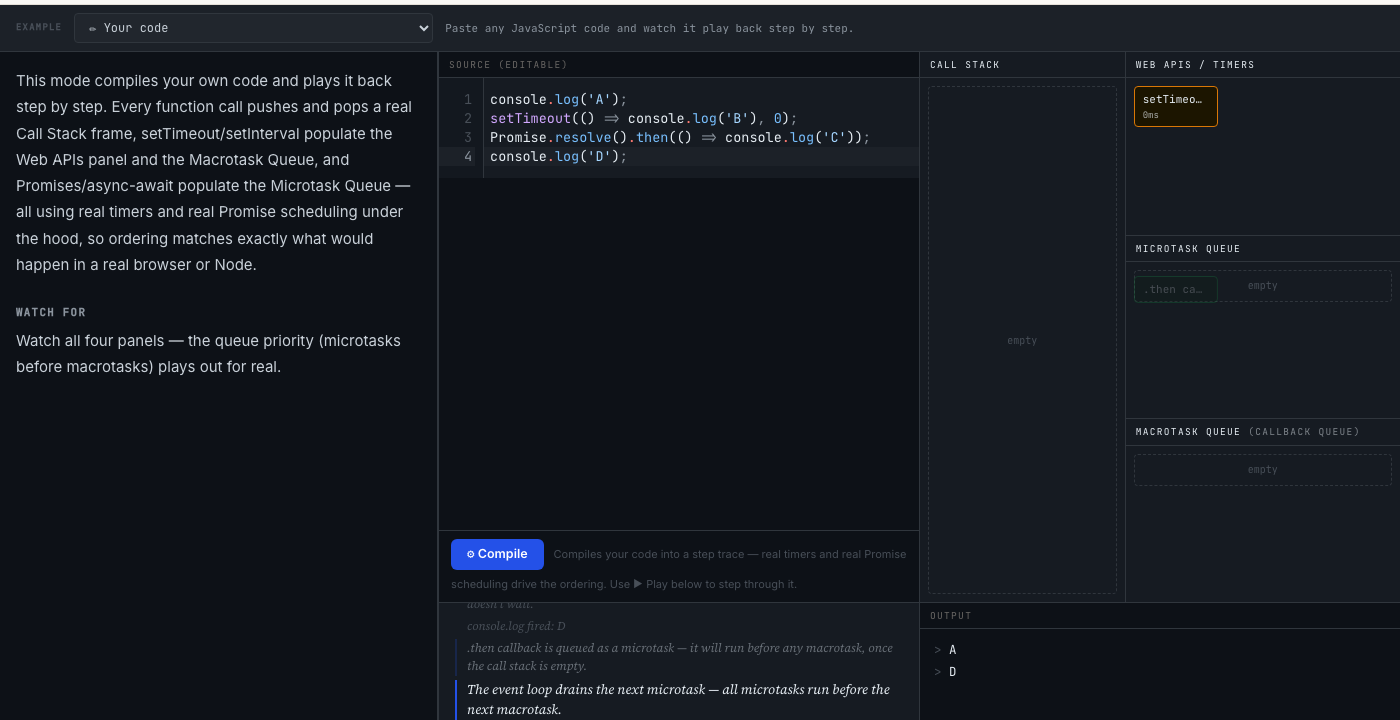
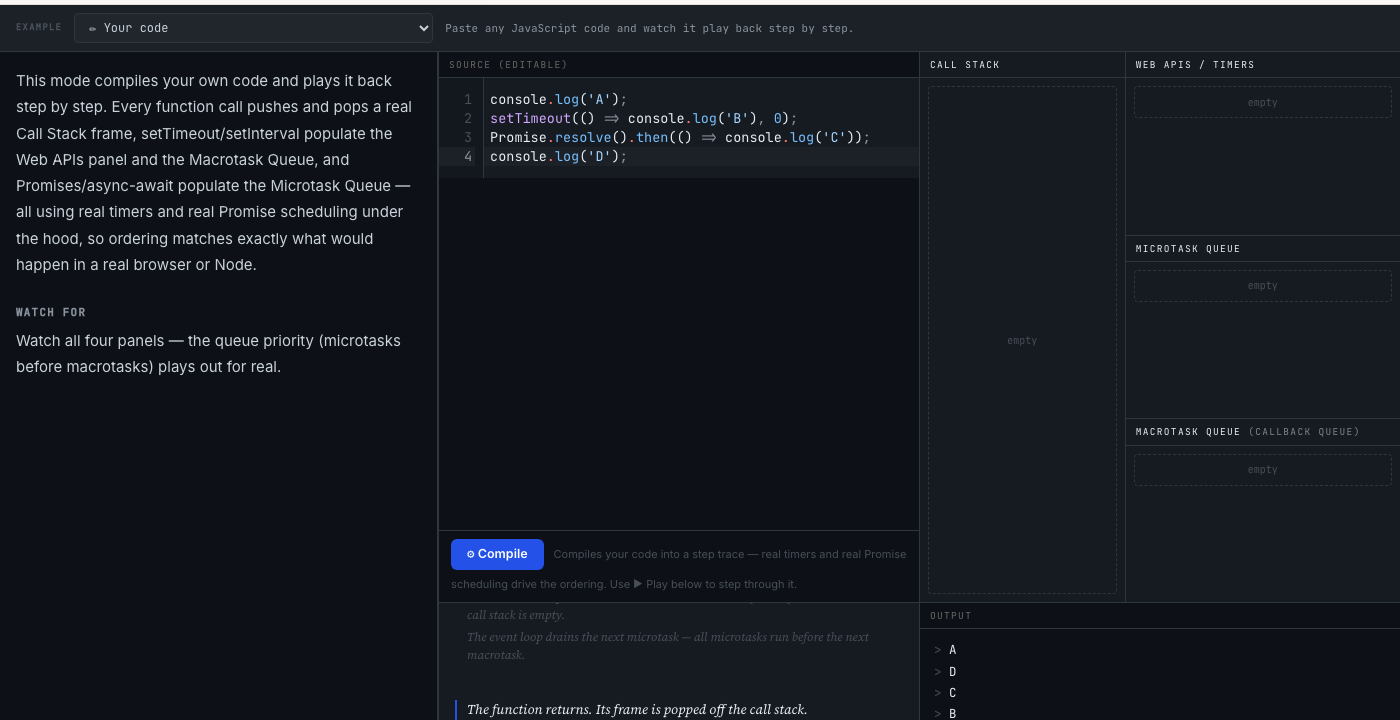
rksagi.com/tutorials/event-loop-visualizer →
The bottom line
There are a million JavaScript tutorials. Most explain what the event loop is. Very few explain why it works the way it does — in a way that sticks, using real production scenarios rather than theoretical examples.
I built one that tries to do that differently. Not because I am an expert who always knew this. Because I was a Java developer who genuinely did not get it for years — and I know exactly where the confusion lives.
I built an interactive version — paste your own code in, run it, watch exactly what the event loop does with it, step by step. If the output of that four-line example surprised you, that is where to start.
rksagi.com/tutorials/javascript-async →
Greatly influenced by Lydia Hallie, Philip Roberts and Andrew Dillon — who explained this better than anyone before I could attempt to.
Found this useful?
Let’s connect on LinkedIn →